How to cull photos before Lightroom. One pass, one key per frame, and only the keeps go into the catalog.
Culling is the first look at a shoot: every frame gets a verdict, keep or reject, before anything is edited. Done before import, it is the fastest hour of the whole job. Done inside the editor, it is usually the slowest. This page is the method, and then the keys that run it in CULL.
Cull before you import
Lightroom was made to edit and organize, and it does both well. It is slow at the first pass for one reason: it has to build its own previews before a frame is sharp on screen, and on a five-thousand-frame folder that is a long wait. The camera already wrote a full-size JPEG inside every RAW file. A culling app reads that one, so the folder is on screen in seconds and the first frame is sharp the moment you reach it.
The second reason is the catalog. Every frame you import is a row in it, with previews on disk, for as long as you keep it. Importing five thousand frames and keeping four hundred means the catalog carries the other 4,600 until you clean up. Cull first, and only the keeps ever go in.
Keep in, don't reject out
There are two ways to run the pass. Rejecting out means looking for what is wrong with each frame. Keeping in means looking for what is right. Keeping in is faster and the result is better, because "would I show this?" has a quick answer and "is anything wrong here?" does not. Default to reject, and promote the frames that earn it.
Three verdicts are enough: reject, keep, and favorite for the few you would print. More levels than that slow the hand and get re-sorted later anyway. Stars belong in the editor, where you compare edits rather than frames.
One pass, at speed
- Decide at first sight. The first impression of a frame is usually the one you end up with. If you cannot decide in a second, keep it for now; the second look will settle it.
- Judge the scene, not the frame. Most shoots are a few hundred scenes shot several times each. See a scene's frames together, pick the one or two to keep, and reject the rest as a group.
- Zoom only to break a tie. Sharpness matters between two frames of the same moment and almost never otherwise. Look at 100 % when two keeps are twins, at the point the camera focused, and not before.
- Do not edit. No crop, no exposure, no straightening while culling. Every adjustment is a change of task, and a frame that needs a fix to be a keep is usually a reject.
- Finish the folder. A cull left half done is a cull done twice. A day's shoot of a few thousand frames is an evening's work at one key per frame.
Where the verdicts go
A verdict is worth keeping only if the editor sees it. Lightroom reads three things from a RAW file's XMP sidecar on import: the pick flag, the reject flag and the color label. So a keep should be written as a pick, a reject as a reject, and a favorite as a pick with a label. Import the folder with Add, so the files stay where they are, and the flags are in the catalog before the first preview is built. Filter on Flagged, and the editing starts on the keeps alone.
The image data must never change. A culling tool that rewrites the RAW file, or writes its verdicts somewhere only it can read, has made the shoot depend on it. A sidecar beside the file is readable by every editor, and by you in ten years.
The same pass in CULL
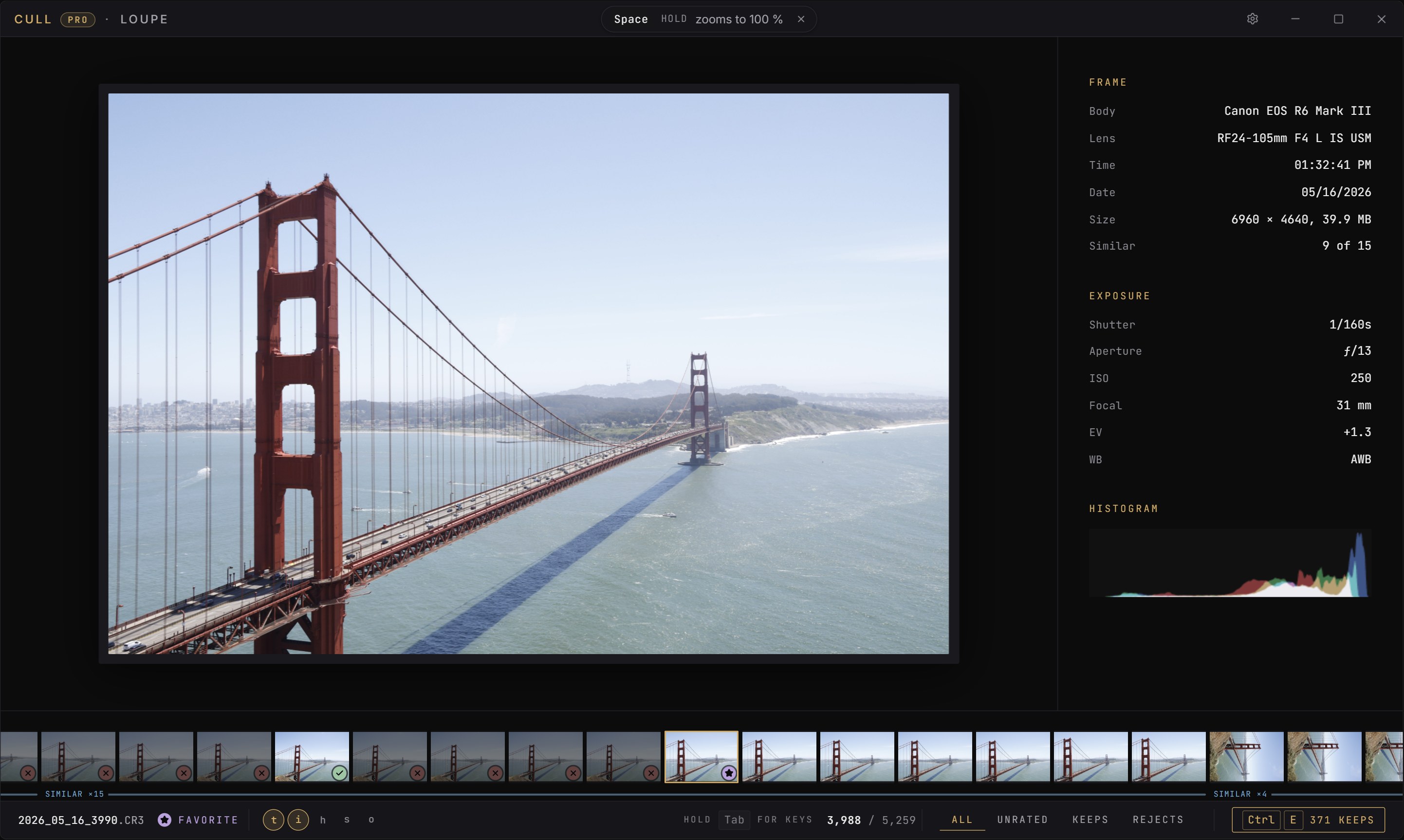
CULL is this method as an app. Open the folder, and the frames are on screen from the previews the camera wrote. Enter keeps a frame, Backspace rejects it, F marks a favorite, the arrows move. Frames of one scene are grouped before you reach them, and a burst is boxed as one. Hold Space and the frame is at 100 %, at the point the camera focused; let go and you are back. Every verdict is written to the sidecar as you go, as Lightroom's pick, reject and purple label, and the file itself is never touched.
Free culls up to 250 frames in one session, with every feature, on Windows and Mac. Download CULL, or read how it compares with culling inside Lightroom.